File Upload
You can upload files using the temporary upload server and use the resulting URL in various endpoints.
Each endpoint has different allowed file sizes, formats, and media lengths, so please check them directly.
The temporary storage period is 72 hours from the upload time. Files are automatically deleted after this period, so please re-upload if needed.
The method for using the temporary upload server is as follows:
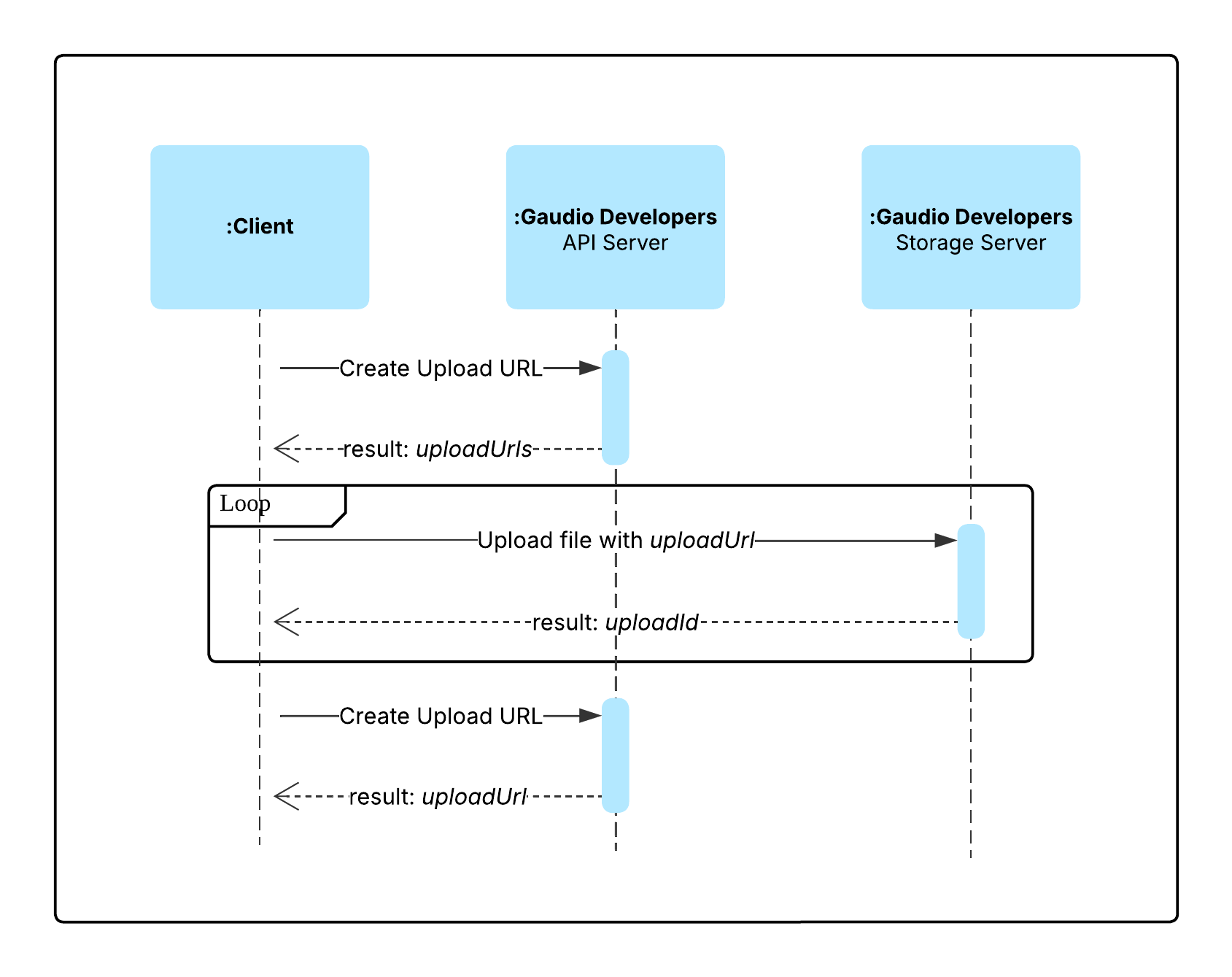
Create Upload URL
POST
https://restapi.gaudiolab.io/developers/api/v1/files/upload-multipart/create
Request creation of upload URL for multipart upload.
You must include authentication information in the request.
This API supports multipart upload, with the server specifying a default chunk size of 1GB (1,073,741,824 bytes). You need to split the file to upload into chunks of this size and upload each chunk to the URLs included in the preSignedUrl array. Each URL in the preSignedUrl array is an S3 pre-signed URL that can be used to upload a file chunk. The upload validity period for generated URLs is 24 hours from the time of creation.
Request Body
| Field | Required | Type | Description |
|---|---|---|---|
fileSize | Yes | Number | Size of the file to upload (bytes) |
fileName | Yes | String | Name of the file to upload (with extension) See docs for allowed formats, size, and duration per API |
Response Body
| Field | Type | Description |
|---|---|---|
uploadId | String | Upload identifier |
chunkSize | Number | Server-specified chunk size for multipart upload (bytes, default 1GB) |
preSignedUrl | Array | Array of pre-signed URLs(String) for each chunk upload |
Request
curl -X POST https://restapi.gaudiolab.io/developers/api/v1/files/upload-multipart/create \
    -H "x-ga-apikey: {API_KEY}" \
    -H "Content-Type: application/json" \
    -d '{
        "fileSize":   1000000,
        "fileName":   "file.mp3"
    }'
Response
{
  "resultCode": 1000,
  "resultData": {
    "uploadId": "uploadId",
    "chunkSize": 1073741824,
    "preSignedUrl": [
      "https://s3.ap-northeast-2.amazonaws.com/your-bucket-name/your-object-key?...",
      "https://s3.ap-northeast-2.amazonaws.com/your-bucket-name/your-object-key?..."
    ]
  }
}
Upload
Upload files using the Upload URL.
Upload proceeds by splitting the file into chunks and sending PUT requests to each URL in the generated preSignedUrl array in order. For each chunk upload, you must retrieve the ETag value from the response header, and collect these ETags with partNumbers to create a parts array for use in the final upload completion request.
Additionally, each chunk upload can be performed simultaneously (in parallel) depending on the network environment. Utilizing parallel uploads can reduce the overall upload time. However, even when uploading in parallel, you must accurately collect the ETag and partNumber from each response to properly manage the upload results.
#!/bin/bash
FILE_PATH="./track.mp3"
CHUNK_SIZE=1073741824 # Set from response body `chunkSize`
PRE_SIGNED_URL=( \
  "https://s3.ap-northeast-2.amazonaws.com/your-bucket-name/your-object-key?..." \
  "https://s3.ap-northeast-2.amazonaws.com/your-bucket-name/your-object-key?..." \
)

PARTS=()
for i in "${!PRE_SIGNED_URL[@]}"; do
  OFFSET=$((i * CHUNK_SIZE))
  ETag=$(dd if="$FILE_PATH" bs=1 skip=$OFFSET count=$CHUNK_SIZE 2>/dev/null | \
    curl --request PUT \
      --url "${PRE_SIGNED_URL[$i]}" \
      --header 'Content-Type: audio/mpeg' \
      --data-binary @- \
      -i 2>/dev/null | grep -Fi ETag | awk '{print $2}' | tr -d '\r\n\"')
  PARTS+=("{\"awsETag\":\"$ETag\",\"partNumber\":$((i+1))}")
done
Complete Upload
POST
https://restapi.gaudiolab.io/developers/api/v1/files/upload-multipart/complete
Notify completion of multipart upload.
Request Body
| Field | Required | Type | Description |
|---|---|---|---|
uploadId | Yes | String | uploadId received when creating multipart upload |
parts | Yes | Array | parts generated during multipart upload |
Request
curl -X POST https://restapi.gaudiolab.io/developers/api/v1/files/upload-multipart/complete \
    -H "x-ga-apikey: {API_KEY}" \
    -H "Content-Type: application/json" \
    -d '{
        "uploadId": "uploadId",
        "parts": [
            {
                "awsETag": "awsETag",
                "partNumber": 1
            },
            ...
        ]
    }'
Response
{
  "resultCode": 1000,
  "resultData": {}
}